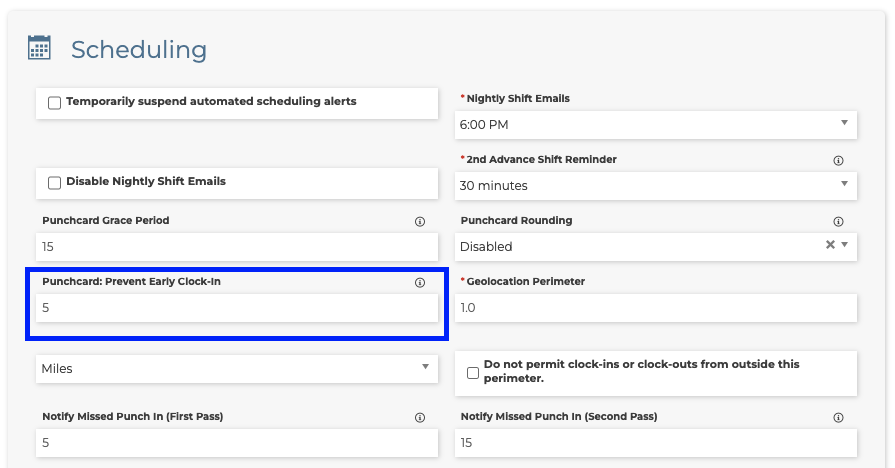
Prevent Caregivers from Clocking in Early
- Go to Menu > Settings > Site Settings.
- Under Scheduling, go to Punchcard: Prevent Early Clock-in.
- Enter a number of minutes.
Note: If the employee tries to clock in prior to the set number of minutes, the clock-in will be rejected. i.e. "5" will prevent clocking in 6 minutes early. Use "0" (zero) to disable this restriction. |
|
|
Related Articles
Clock in issues regarding location
When a caregiver is clocking into a shift and receives a similar error shown below you may need to make sure the client's address has been verified in their profile. This error is centered around the site setting around the Geolocation Perimeter. If ...
Exempt Client From Geolocation Perimeter
This would be helpful if you have a Client that staff may clock in for Office or Admin duties. If your GEO location perimeter is required to be within a certain distance this may cause issues for staff at clock in. You can now exempt those clients so ...
Offline Mode
Note: Offline mode must first be enabled by Smartcare Support. If it is not enabled, please email Support@Aaniie.com Offline Mode Tip Sheet Overview Offline Mode allows caregivers to continue using the Aaniie mobile application when internet service ...
Punchcard Reimbursable Expenses
Sometimes caregivers will have expenses that the agency will reimburse. To file a claim for your reimbursement while clocking out, follow the steps below. Navigate to the punchcard to clock out by going to the Menu>Personal>Punchcard. Once in ...
Travel Time Automatic Shifts
Automatic Travel Time Shifts Tip Sheet Overview The Automatic Travel Time Shifts feature allows Aaniie to automatically create travel time shifts when a caregiver travels between scheduled client visits at different addresses. These travel time ...