Site Settings: Confirm or Edit Agency Billing Contact Information
Site Settings: Confirm or Edit Agency Billing Contact Information
Here’s how to review your agency’s billing contact entered in Aaniie:
Navigate to Site Settings
Log in to your Aaniie Care site and navigate to site settings (Menu > Settings > Site Settings.)
Scroll down to the Company Billing Contact Information section.
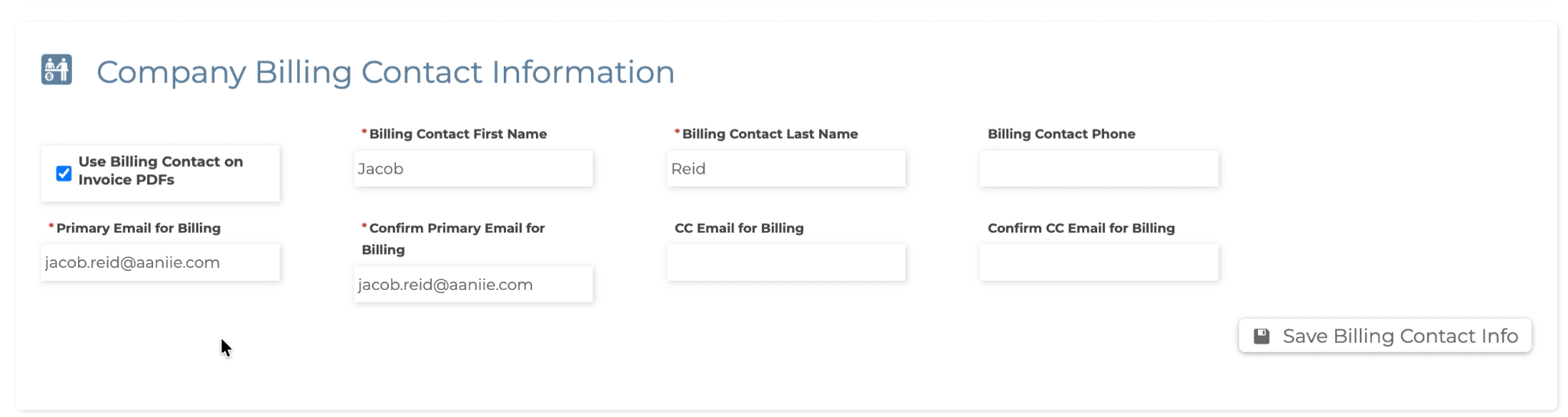
Modify the contact information as you see fit, and click the Save Billing Contact Info button to save your changes.
Note: You may choose to check the Use Billing Contact on Invoice PDFs to show the designated billing contact information on all invoice PDFs generated for clients within Aaniie.
The agency’s billing contact information is now updated with your changes.
Need Assistance?
Our dedicated Customer Support team is available and ready to help you. If you have questions or need assistance, please call us at 715-227-3768 or email support@aaniie.com.
You can also explore our ongoing live webinars and training sessions. Visit our Group Training Calendar for details on upcoming sessions and more learning opportunities.
Log in to your Aaniie Care site and navigate to site settings (Menu > Settings > Site Settings.)
Scroll down to the Company Billing Contact Information section.
Modify the contact information as you see fit, and click the Save Billing Contact Info button to save your changes.
Note: You may choose to check the Use Billing Contact on Invoice PDFs to show the designated billing contact information on all invoice PDFs generated for clients within Aaniie.
The agency’s billing contact information is now updated with your changes.
Related Articles
Site Settings: Confirm or Edit Agency Contact Information
Site Settings: Confirm or Edit Agency Contact Information Here’s how to review your agency’s contact details entered in Aaniie: Navigate to Site Settings Log in to your Aaniie Care site and navigate to site settings (Menu > Settings > Site Settings.) ...Site Settings - NPI/EIN
Verifying and Updating Agency NPI and EIN Information Tip Sheet Overview The National Provider Identifier (NPI) and Employer Identification Number (EIN/FEIN) are important pieces of agency information used for billing, claims processing, reporting, ...Applicants - Site Settings
The Applicants section of the Site Settings allows you to edit what applicants must do during the application process. To edit this section, follow the instructions below. Click on the Site Settings quicklink or navigate there through ...Scheduling in Site Settings
There are several scheduling functions that are available within the Site Settings. These options allow you to determine a wide variety of things related to the scheduling systems within SmartCare. These options span from when shift reminder emails ...Company and Mailing Label Logo
Company Logo and Mailing Label Logo Tip Sheet Overview Aaniie allows agencies to upload both a Company Logo and a Mailing Label Logo through Site Settings. These logos are used in different areas of the system and have specific size requirements. ...