Register Lead as Applicant
Once you gather the necessary information to determine whether a lead is a qualified applicant, it's easy to register them as an applicant.
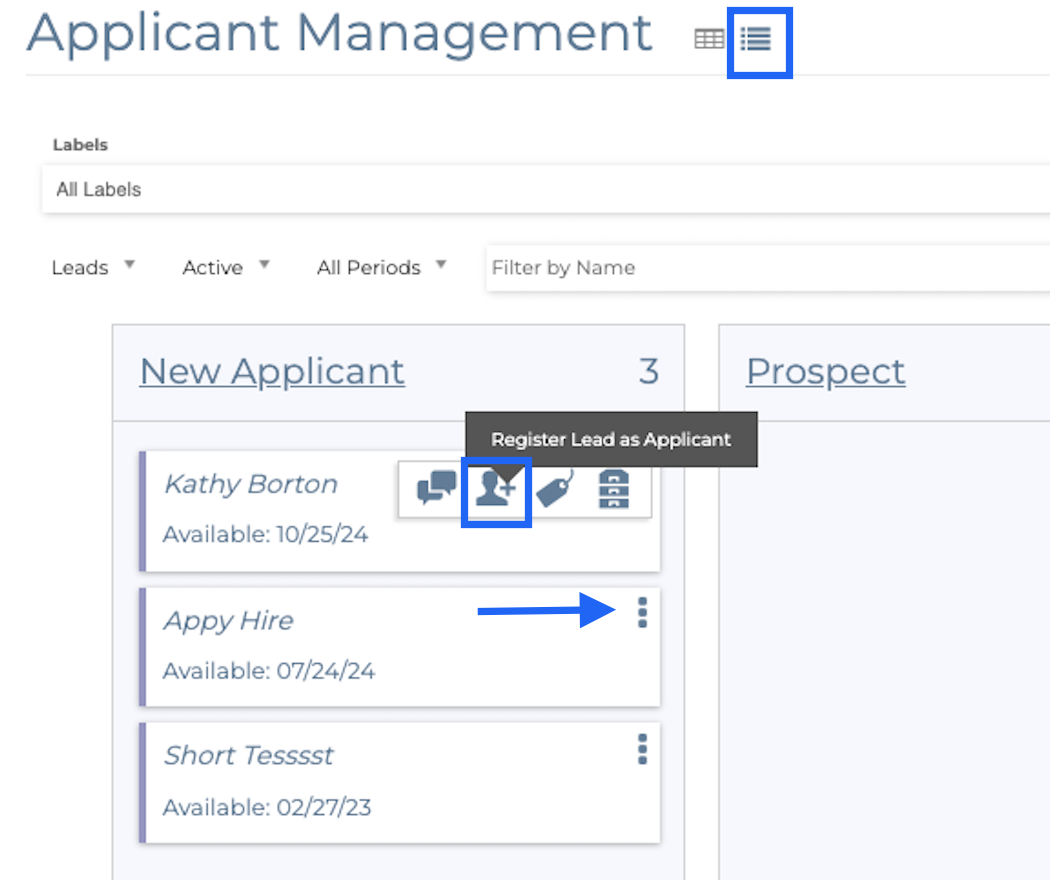


1. Navigate to the Applicant Management found in Menu>Staff>Applicant Management.
2. In the dashboard view, select the three dots next to the applicant name and select Register Lead as Applicant.
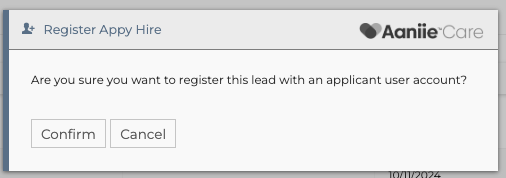
2. Select Confirm.
3. In the table view, select the Register Lead as Applicant option found the right of the leads name in the actions area.
4. Click confirm on the pop up asking if you would like to register the lead to an applicant.
5. With a lead now as a registered applicant you can now have a password reset to sent to them to access the system to fill out the application and ethics evaluation.
Related Articles
Archive and Unarchive an Applicant Lead
If a applicant lead is not qualified, or they stop responding, it may be time to archive their information. To archive a lead: 1. In the Table view, select the filing cabinet option under actions to archive the lead. 2. Select Yes, Archive. 3. In the ...Applicant Leads Import
Importing applicant leads is found in Menu > Staff > Applicant Management. It is only found in the Table view when viewing leads. Select the arrow icon in the top right section of the page. Please see the attached file template needed to correctly ...ENGAGE Applicant Management Lead Questions
Attached are screenshots of the questions on the ENGAGE lead form for applicants.ENGAGE Applicant Management Tip Sheet
ENGAGE Applicant Management System The ENGAGE Hiring Hub is Aaniie’s integrated applicant management system designed to simplify the process of recruiting and hiring caregivers. ENGAGE makes use of marketing concepts to create an applicant pipeline ...Updating Applicant Status
Updating the status of applications within the Aaniie system is essential because you will want to keep track of which applicants you are hiring and those whose applications you will be archiving. To update applicant status follow the instructions ...